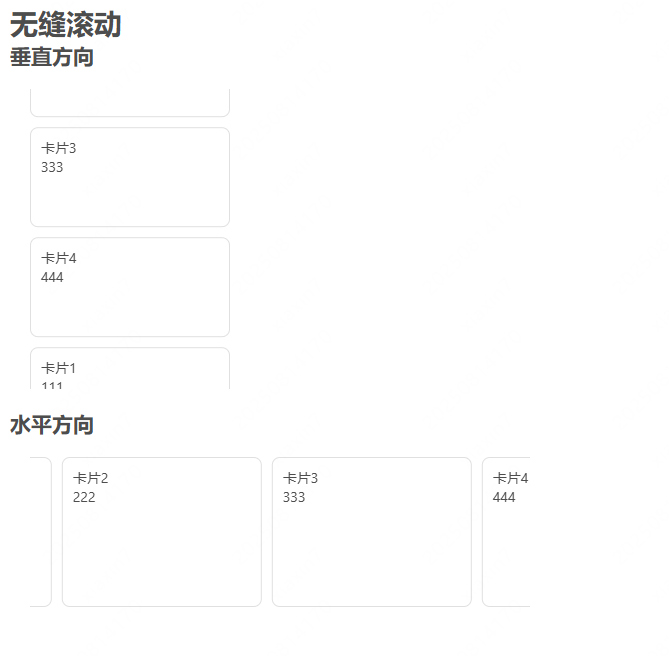
基于vue.js的无缝滚动

基于vue.js的无缝滚动

在这里插入图片描述

方法一:基于requestAnimationFrame

demo

1
2
3
4
5
6
7
8
9
10
11
12
13
14
15
16
17
18
19
20
21
22
23
24
25
26
27
28
29
30
31
32
33
34
35
36
37
38
39
40
41
42
43
44
45
46
47
48
49
50
51
52
53
54
55
56
57
58
59
60
61
62
63
64
65
66
67
68
69
70
71
72
73
74
75
76
77
78
79
80
81
82
83
84
85
86
87
88
89
90
91
92
93
94
95
96
97
98
99
100
<template>
<h-page-container class="hoem-page">
<h1>无缝滚动</h1>
<h2>垂直方向</h2>
<div class="container1">
<AutoScroll :data="list" :item-height="110" :limit-move-num="3" :is-rem="false">
<template #item="{ keySuffix }">
<div v-for="(item, index) in list" :key="`${item.id || index}${keySuffix || ''}`" class="card">
<div>{{ item.title }}</div>
<div>{{ item.content }}</div>
</div>
</template>
</AutoScroll>
</div>

<h2>水平方向</h2>
<div class="container2">
<AutoScroll :data="list" :direction="2" :item-width="210" :limit-move-num="3" :is-rem="false">
<template #item="{ keySuffix }">
<div v-for="(item, index) in list" :key="`${item.id || index}${keySuffix || ''}`" class="card">
<div>{{ item.title }}</div>
<div>{{ item.content }}</div>
</div>
</template>
</AutoScroll>
</div>
</h-page-container>
</template>

<script setup>
import { ref } from 'vue'
import AutoScroll from '@/components/AutoScroll.vue'

const list = ref([
{
id: 1,
title: '卡片1',
content: '111'
},
{
id: 2,
title: '卡片2',
content: '222'
},
{
id: 3,
title: '卡片3',
content: '333'
},
{
id: 4,
title: '卡片4',
content: '444'
}
])


</script>

<style lang="scss" scoped>
.hoem-page {
width: 100%;
height: 100vh;
padding: 10px;
}

.container1 {
width: 200px;
height: 300px;
margin: 20px;
overflow: hidden;

.card {
width: 100%;
height: 100px;
border: 1px solid #e0e0e0;
border-radius: 8px;
margin-bottom: 10px;
padding: 10px;
}
}


.container2 {
width: 500px;
height: 150px;
margin: 20px;
overflow: hidden;

.card {
width: 200px;
height: 100%;
border: 1px solid #e0e0e0;
border-radius: 8px;
margin-right: 10px;
padding: 10px;
}
}
</style>

AutoScroll.vue

1
2
3
4
5
6
7
8
9
10
11
12
13
14
15
16
17
18
19
20
21
22
23
24
25
26
27
28
29
30
31
32
33
34
35
36
37
38
39
40
41
42
43
44
45
46
47
48
49
50
51
52
53
54
55
56
57
58
59
60
61
62
63
64
65
66
67
68
69
70
71
72
73
74
75
76
77
78
79
80
81
82
83
84
85
86
87
88
89
90
91
92
93
94
95
96
97
98
99
100
101
102
103
104
105
106
107
108
109
110
111
112
113
114
115
116
117
118
119
120
121
122
123
124
125
126
127
128
129
130
131
132
133
134
135
<template>
<div class="scroll-list" :style="listStyle" @mouseover="pauseAnimation" @mouseout="animate">
<slot name="item" key-suffix=""></slot> <!-- 原始内容 -->
<template v-if="shouldDuplicate">
<slot name="item" key-suffix="_copy"></slot> <!-- 复制内容,添加后缀 -->
</template>
</div>
</template>

<script setup>
import { ref, onBeforeUnmount, watch, computed } from 'vue'
// 定义滚动方向枚举
const Direction = {
DOWN: 0,
UP: 1,
LEFT: 2,
RIGHT: 3
}

const props = defineProps({
// 列表
data: {
type: Array,
default: () => []
},
// 方向: 0 往下 1 往上 2 向左 3 向右
direction: {
type: Number,
default: 1
},
/**
* 一个列表元素的高度(包含外边距)
* direction为0 往下 1 往上时
*/
itemHeight: {
type: Number,
default: null
},
/**
* 一个列表元素的宽度(包含外边距)
* direction为2 向左 3 向右时
*/
itemWidth: {
type: Number,
default: null
},
// itemHeight的单位是否是rem
isRem: {
type: Boolean,
default: true
},
// 开启无缝滚动的数据量。
limitMoveNum: {
type: Number,
default: 5
},
// 几列
columns: {
type: Number,
default: 1
}
})

// 是否需要复制内容
const shouldDuplicate = computed(() => props.data.length >= props.limitMoveNum)

const requestId = ref(null)
const offset = ref(0)

// 判断是否为垂直方向
const isVertical = computed(() => props.direction === Direction.DOWN || props.direction === Direction.UP)

// 计算列表样式
const listStyle = computed(() => ({
transform: `${isVertical.value ? 'translateY' : 'translateX'}(${offset.value}${props.isRem ? 'rem' : 'px'})`,
display: isVertical.value ? 'block' : 'flex'
}))

// 计算最大偏移量
const maxOffset = computed(() => {
return Math.ceil(props.data.length / props.columns) *
(isVertical.value ? props.itemHeight : props.itemWidth)
})

// 开始动画
const animate = () => {
if (props.data?.length < props.limitMoveNum) return

requestId.value = requestAnimationFrame(() => {
animate()
offset.value += (props.direction === Direction.UP || props.direction === Direction.LEFT) ? -0.3 : 0.3

// 当滚动完一轮后重置位置
if (Math.abs(offset.value) >= maxOffset.value) {
offset.value = 0
}
})
}

// 暂停动画
const pauseAnimation = () => {
if (requestId.value) {
cancelAnimationFrame(requestId.value)
requestId.value = null
}
}

watch(() => props.data, (val) => {
if (val?.length >= props.limitMoveNum) {
pauseAnimation()
animate()
}
}, {
immediate: true
})

onBeforeUnmount(() => {
pauseAnimation()
})

</script>

<style lang="scss" scoped>
.scroll-list {
width: 100%;
height: 100%;
/* 确保动画在合成层运行 */
backface-visibility: hidden;

&>* {
flex-grow: 0;
flex-shrink: 0;
}
}
</style>

**

方法二:基于animation动画

**
demo

1
2
3
4
5
6
7
8
9
10
11
12
13
14
15
16
17
18
19
20
21
22
23
24
25
26
27
28
29
30
31
32
33
34
35
36
37
38
39
40
41
42
43
44
45
46
47
48
49
50
51
52
53
54
55
56
57
58
59
60
61
62
63
64
65
66
67
68
69
70
71
72
73
74
75
76
77
78
79
80
81
82
83
84
85
86
87
88
89
90
91
92
93
94
95
96
97
98
99
100
<template>
<h-page-container class="hoem-page">
<h1>无缝滚动</h1>
<h2>垂直方向</h2>
<div class="container1">
<AutoScroll :data="list" :item-height="110" :limit-move-num="3">
<template #item="{ keySuffix }">
<div v-for="(item, index) in list" :key="`${item.id || index}${keySuffix || ''}`" class="card">
<div>{{ item.title }}</div>
<div>{{ item.content }}</div>
</div>
</template>
</AutoScroll>
</div>

<h2>水平方向</h2>
<div class="container2">
<AutoScroll :data="list" :direction="2" :item-width="210" :limit-move-num="3">
<template #item="{ keySuffix }">
<div v-for="(item, index) in list" :key="`${item.id || index}${keySuffix || ''}`" class="card">
<div>{{ item.title }}</div>
<div>{{ item.content }}</div>
</div>
</template>
</AutoScroll>
</div>
</h-page-container>
</template>

<script setup>
import { ref } from 'vue'
import AutoScroll from '@/components/AutoScroll.vue'

const list = ref([
{
id: 1,
title: '卡片1',
content: '111'
},
{
id: 2,
title: '卡片2',
content: '222'
},
{
id: 3,
title: '卡片3',
content: '333'
},
{
id: 4,
title: '卡片4',
content: '444'
}
])


</script>

<style lang="scss" scoped>
.hoem-page {
width: 100%;
height: 100vh;
padding: 10px;
}

.container1 {
width: 200px;
height: 300px;
margin: 20px;
overflow: hidden;

.card {
width: 100%;
height: 100px;
border: 1px solid #e0e0e0;
border-radius: 8px;
margin-bottom: 10px;
padding: 10px;
}
}


.container2 {
width: 500px;
height: 150px;
margin: 20px;
overflow: hidden;

.card {
width: 200px;
height: 100%;
border: 1px solid #e0e0e0;
border-radius: 8px;
margin-right: 10px;
padding: 10px;
}
}
</style>

AutoScroll.vue

1
2
3
4
5
6
7
8
9
10
11
12
13
14
15
16
17
18
19
20
21
22
23
24
25
26
27
28
29
30
31
32
33
34
35
36
37
38
39
40
41
42
43
44
45
46
47
48
49
50
51
52
53
54
55
56
57
58
59
60
61
62
63
64
65
66
67
68
69
70
71
72
73
74
75
76
77
78
79
80
81
82
83
84
85
86
87
88
89
90
91
92
93
94
95
96
97
98
99
100
101
102
103
104
105
106
107
108
109
110
111
112
113
114
115
116
117
118
119
120
121
122
123
124
125
126
127
128
129
130
131
132
133
134
135
136
137
138
139
140
141
142
143
144
145
146
147
148
149
150
151
152
153
154
155
156
157
158
159
160
161
162
163
164
165
166
167
168
169
170
171
172
173
174
175
176
177
178
179
180
181
182
183
184
185
186
187
188
189
190
191
192
193
194
195
196
<template>
<div class="auto-scroll" :class="scrollClass" @mouseenter="setScrollPause(true)" @mouseleave="setScrollPause(false)">
<div ref="scrollContent" class="scroll-content" :style="contentStyle">
<slot name="item" :key-suffix="''"></slot>
<template v-if="shouldDuplicate">
<slot name="item" :key-suffix="'_copy'"></slot>
</template>
</div>
</div>
</template>

<script setup>
import { ref, computed, onMounted, onBeforeUnmount } from 'vue'

const props = defineProps({
// 列表
data: {
type: Array,
default: () => []
},
// 方向: 0 往下 1 往上 2 向左 3 向右
direction: {
type: Number,
default: 0
},
/**
* 一个列表元素的高度(包含外边距)
* direction为0 往下 1 往上时
*/
itemHeight: {
type: Number,
default: 40
},
/**
* 一个列表元素的宽度(包含外边距)
* direction为2 向左 3 向右时
*/
itemWidth: {
type: Number,
default: 100
},
// 开启无缝滚动的数据量。
limitMoveNum: {
type: Number,
default: 5
},
// 完整滚动周期(秒)
duration: {
type: Number,
default: 10
},
// 鼠标悬浮暂停
hoverPause: {
type: Boolean,
default: true
}
})

const scrollContent = ref(null)
const isPaused = ref(false)

// 判断是否为垂直方向
const isVertical = computed(() => props.direction <= 1)

// 是否需要复制内容
const shouldDuplicate = computed(() => props.data.length >= props.limitMoveNum)

// 滚动方向
const scrollClass = computed(() => [
`direction-${props.direction}`,
isVertical.value ? 'vertical' : 'horizontal'
])

// 内容样式计算
const contentStyle = computed(() => {
const sizeProp = isVertical.value ? 'height' : 'width'
const itemSize = isVertical.value ? props.itemHeight : props.itemWidth
const contentSize = props.data.length * itemSize

return {
[sizeProp]: shouldDuplicate.value ? `${contentSize * 2}px` : `${contentSize}px`,
'animation-duration': `${props.duration}s`,
'animation-play-state': isPaused.value ? 'paused' : 'running'
}
})

// 动画控制
const setScrollPause = (paused) => {
if (props.hoverPause) {
isPaused.value = paused
}
}


// 生命周期
onMounted(() => {
if (shouldDuplicate.value) {
setScrollPause(false)
}
})

onBeforeUnmount(() => {
setScrollPause(true)
})
</script>

<style scoped>
.auto-scroll {
width: 100%;
height: 100%;
overflow: hidden;
position: relative;
}

.scroll-content {
position: absolute;
will-change: transform;
animation-timing-function: linear;
animation-iteration-count: infinite;
}

/* 垂直方向样式 */
.vertical .scroll-content {
width: 100%;
}

/* 水平方向样式 */
.horizontal .scroll-content {
height: 100%;
display: flex;
}

/* 方向0: 往下 */
.direction-0 .scroll-content {
top: 0;
animation-name: scrollDown;
}

/* 方向1: 往上 */
.direction-1 .scroll-content {
bottom: 0;
animation-name: scrollUp;
}

/* 方向2: 向左 */
.direction-2 .scroll-content {
left: 0;
animation-name: scrollLeft;
}

/* 方向3: 向右 */
.direction-3 .scroll-content {
right: 0;
animation-name: scrollRight;
}

@keyframes scrollDown {
0% {
transform: translateY(0);
}

100% {
transform: translateY(-50%);
}
}

@keyframes scrollUp {
0% {
transform: translateY(0);
}

100% {
transform: translateY(50%);
}
}

@keyframes scrollLeft {
0% {
transform: translateX(0);
}

100% {
transform: translateX(-50%);
}
}

@keyframes scrollRight {
0% {
transform: translateX(0);
}

100% {
transform: translateX(50%);
}
}
</style>

基于vue.js的无缝滚动
http://example.com/2025/05/11/基于vue.js的无缝滚动/
作者
Guo HL
发布于
2025年5月11日
许可协议